SUMIF और SUMIFS Formula Notes (Student Explanation)
May 27, 2026 2026-05-27 8:08SUMIF और SUMIFS Formula Notes (Student Explanation)
SUMIF Formula क्या होता है?
SUMIF Formula का उपयोग किसी एक Condition के आधार पर Total निकालने के लिए किया जाता है।
Syntax:
=SUMIF(Range, Criteria, Sum_Range)
मतलब:
- Range → जहाँ Condition check होगी
- Criteria → कौन सी value जोड़नी है
- Sum_Range → किस Range का Total करना है
आपके Example में समझिए
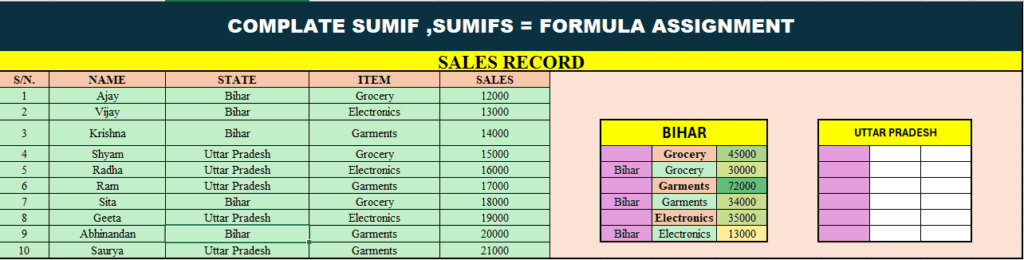
टेबल में:
- STATE Column = C
- ITEM Column = D
- SALES Column = E
1. Bihar का Grocery Sales Total
Formula:
=SUMIF(C2:C11,”Bihar”,E2:E11)
यह Formula Bihar State की सभी Sales को जोड़ देगा।
लेकिन अगर केवल Grocery का Total चाहिए तो SUMIFS लगेगा।
SUMIFS Formula क्या होता है?
SUMIFS Formula का उपयोग Multiple Conditions के आधार पर Total निकालने के लिए किया जाता है।
Syntax:
=SUMIFS(Sum_Range, Criteria_Range1, Criteria1, Criteria_Range2, Criteria2)
Table के अनुसार Formula
1. Bihar + Grocery Total
=SUMIFS(E2:E11,C2:C11,”Bihar”,D2:D11,”Grocery”)
Result:
45000
Explanation:
- पहले Bihar खोजेगा
- फिर Grocery खोजेगा
- दोनों match होने पर Sales जोड़ देगा
2. Bihar + Garments Total
=SUMIFS(E2:E11,C2:C11,”Bihar”,D2:D11,”Garments”)
Result:
72000
3. Bihar + Electronics Total
=SUMIFS(E2:E11,C2:C11,”Bihar”,D2:D11,”Electronics”)
Result:
13000
Student को आसान भाषा में समझाएं
SUMIF
👉 एक Condition पर Total निकालता है।
Example:
केवल Bihar की Sales जोड़ो।
SUMIFS
👉 एक से ज्यादा Conditions पर Total निकालता है।
Example:
Bihar State में केवल Grocery Item की Sales जोड़ो।
Important Points
| Formula | Conditions |
| SUMIF | 1 Condition |
| SUMIFS | Multiple Conditions |
Shortcut Trick
SUMIF
👉 Single Condition = SUMIF
SUMIFS
👉 More than One Condition = SUMIFS
Practice Questions
- Uttar Pradesh का Grocery Total निकालिए
- Bihar का Electronics Total निकालिए
- Uttar Pradesh का Garments Total निकालिए